
3.1.0 - $ Variables, Richer Editor & Dark Mode
Version 3.1.0 makes writing templates faster and brings the editor in line with Jira: variables open as you type, the editor gains Jira’s panels, emoji, status and dates, and the whole app follows Jira’s dark mode.
Type $ to insert a variable
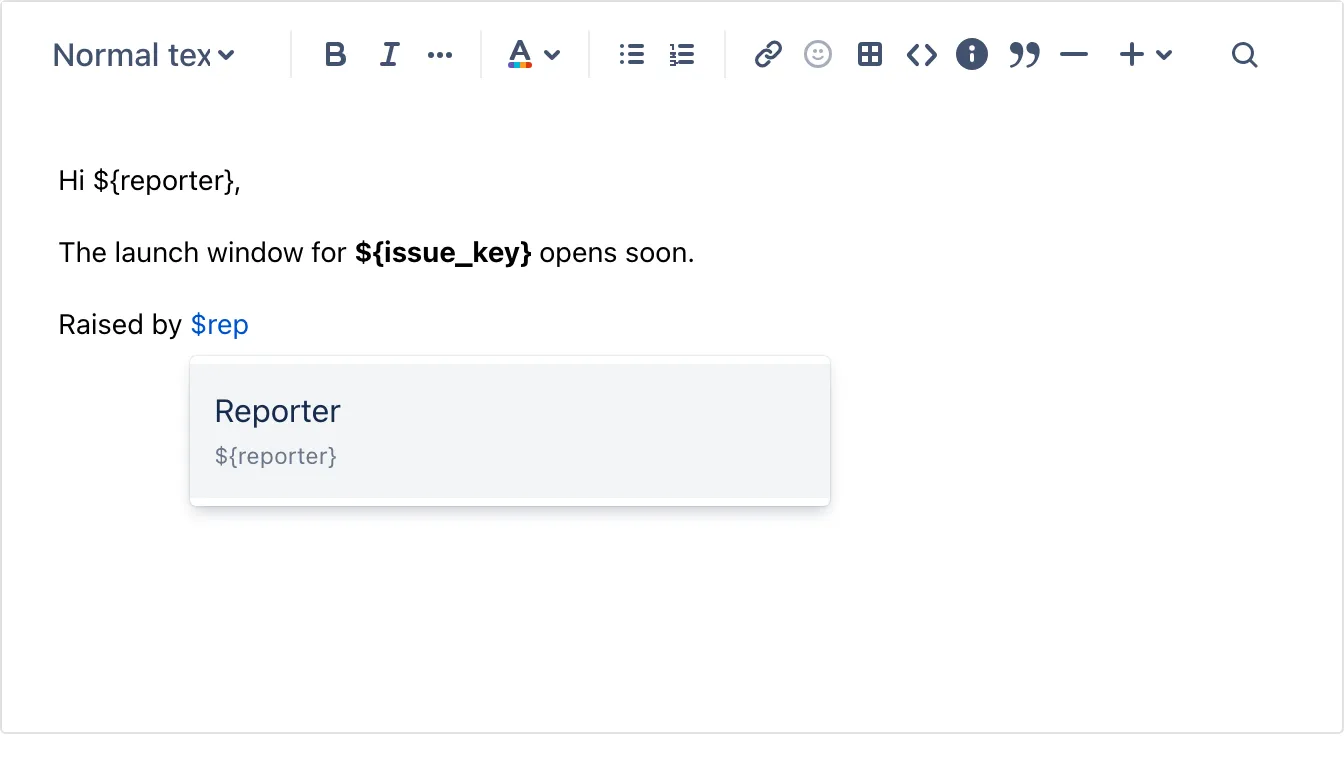
Section titled “Type $ to insert a variable”While writing a template or a signature, type $ and a list of variables opens right at the cursor.
- Keep typing to narrow it down:
$repfinds Reporter. - Press Enter to insert it, for example
${reporter}. - Press Escape and the
$stays as you typed it, so prices are left alone.
There’s no need to copy variables from the dropdown and paste them in any more.
For detailed info: $ Variables to create dynamic templates
A richer editor: panels, emoji, status, dates and more
Section titled “A richer editor: panels, emoji, status, dates and more”The editor in templates, signatures and the issue panel now has the elements you know from Jira:
- Info, note, success, warning and error panels
- An emoji picker, status lozenges and dates
- Expandable sections, indentation, and find and replace
- Tables with cell colours, column widths and numbered rows
- Code blocks with a copy button
The template dialog is wider, and its editor makes room when a list or picker opens, so nothing is cut off.
Dark mode
Section titled “Dark mode”Response Templates now follows the theme you choose in Jira. In dark mode, the issue panel, the template and signature dialogs, the admin pages and the editor all turn dark. That includes panels, tables, code blocks, and the editor’s menus and pickers. Light mode looks exactly as before.
To switch, open your profile picture in Jira and pick a theme.
And more
Section titled “And more”Plus many smaller improvements and bug fixes across templates, signatures and variables.