
Checklist History
Overview
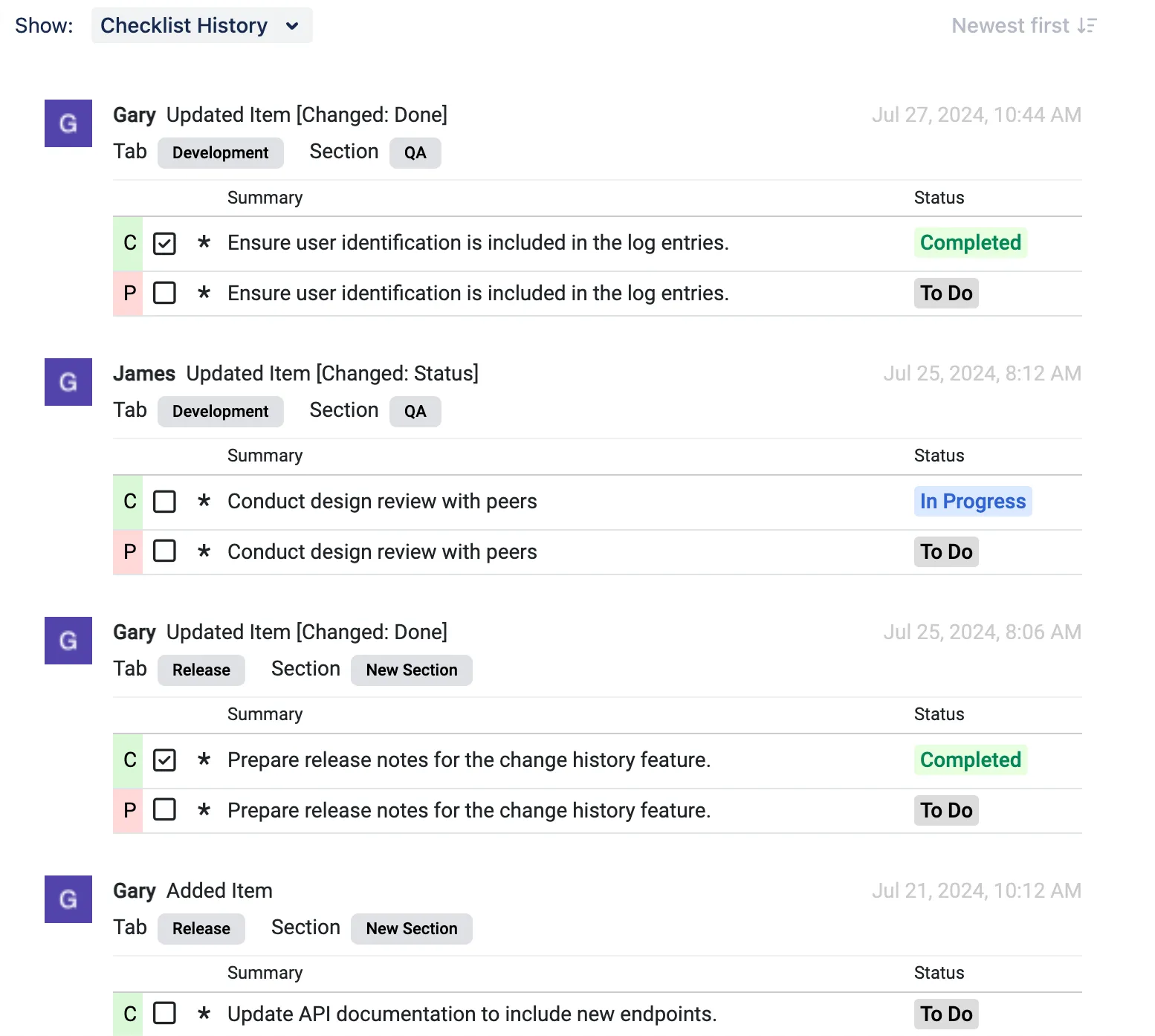
Section titled “Overview”The Checklist History feature allows users to track and view the changes made to checklist items, sections, and tabs. This feature provides a comprehensive log of modifications, ensuring transparency and accountability within the application.
How to Enable
Section titled “How to Enable”To enable checklist history, go to Project > Checklist for Jira Cloud > Settings > Enable History
Feature Description
Section titled “Feature Description”The Change History feature logs the following actions within the checklist application:
-
Items: Adding, editing, deleting, marking as complete/incomplete.
-
Sections: Adding, editing, deleting, and renaming.
-
Tabs: Adding, editing, deleting, and renaming tabs.
Each change log entry includes the following:
-
The type of action performed.
-
The user who performed the change.
-
The timestamp of the action.
-
The old and new values (if applicable).
Viewing Change History
Section titled “Viewing Change History”The history is displayed chronologically, showing the most recent changes first. To access the checklist
-
Navigate to the ticket with a checklist.
-
Click on the “Checklist History” button.
-
The change history will be displayed, listing all recorded changes.