
Jira Service Management
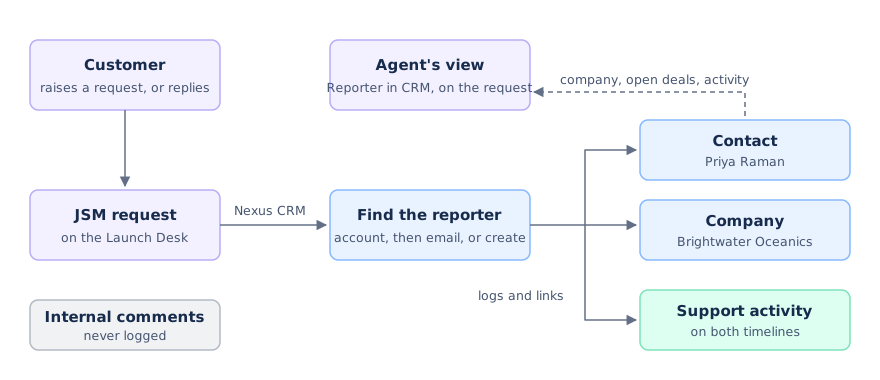
When your service desk and your CRM are the same tool, an agent answering a request can see the customer behind it, and the account manager can see every request the customer raised.
Who’s asking
Section titled “Who’s asking”Turn Nexus CRM on for your service space (see Placement in work items), and every request shows the reporter in the CRM.
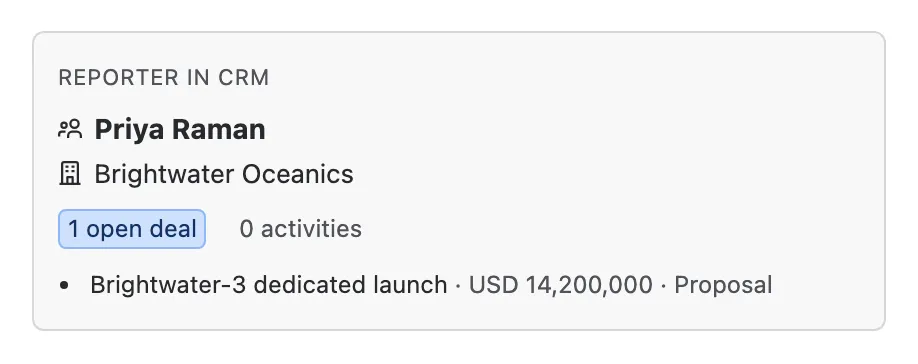

- The reporter’s contact.
- Their company.
- Their open deals, up to three, so an agent knows a renewal is in play before replying.
- How much activity they have in the CRM.
If the reporter isn’t in the CRM yet, the request says so.
Requests and replies, logged for you
Section titled “Requests and replies, logged for you”Every new request and every public reply becomes a Support activity on the reporter’s contact and their company, and the request is linked to both. Your account managers see the full support history on the customer’s timeline, under the Support filter, without anyone typing it in. A reporter who isn’t in the CRM yet becomes a new contact.
Internal comments are never logged.
Bringing your customers in
Section titled “Bringing your customers in”To fill the CRM with your service desk’s customers and organisations in the first place, an admin runs JSM Sync.