
JSM Sync
JSM Sync turns your service desk’s audience into CRM records: customers become contacts, organisations become companies, and each customer is linked to their organisation’s company.
Settings → Jira → JSM Sync needs Settings: Admin.
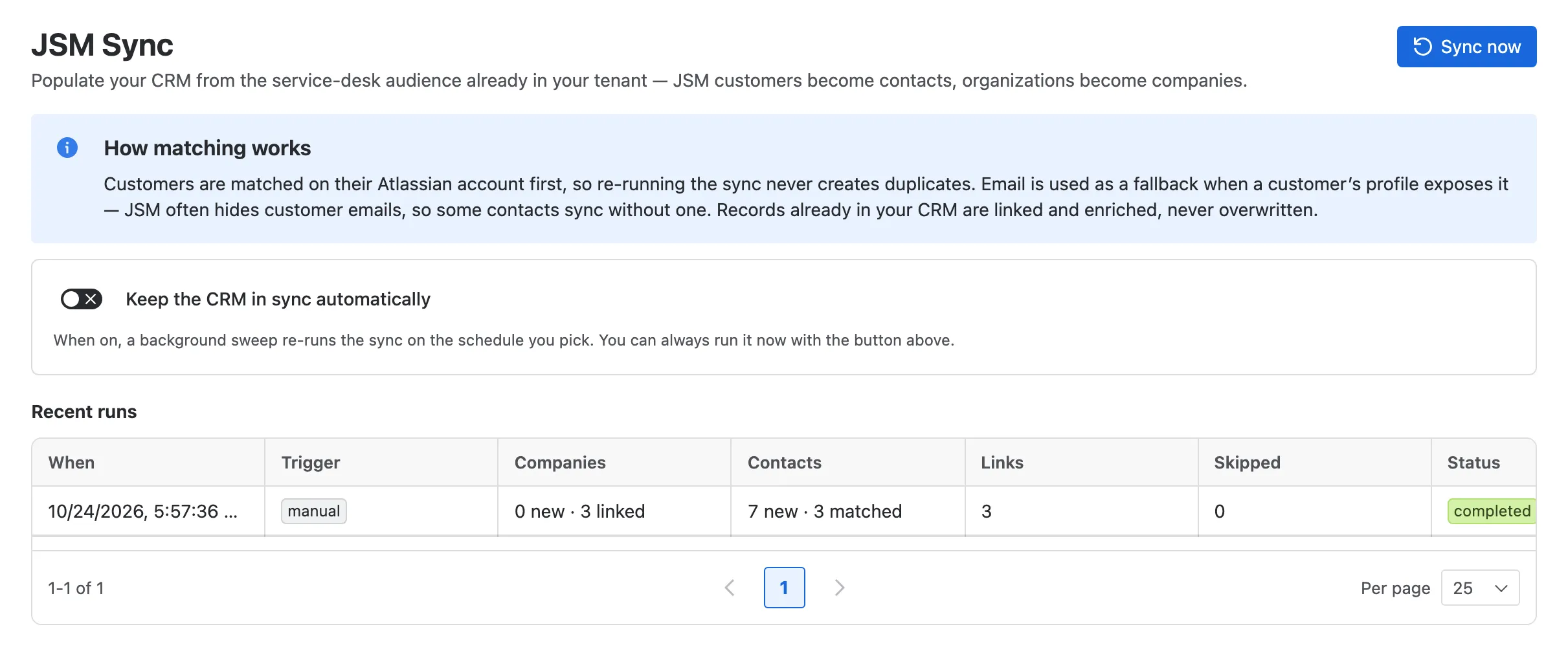
- Sync now runs a sync across every service space. The counts update while it runs.
- Keep the CRM in sync automatically, every 6 hours, every 12 hours, daily or weekly.
- Recent runs: when each ran, what started it, and how many companies, contacts and links it created or matched, and how many it skipped.
- How matching works, in brief.
How matching works
Section titled “How matching works”Running a sync again never duplicates anyone:
- People are matched by their Atlassian account first, so one person stays one contact even if they raise requests on several service desks. Email is a fallback: service desk customers often hide their email, and the sync never reveals details Jira hides.
- Organisations are matched by their JSM organisation first, then by name: an organisation called Brightwater Oceanics is joined to your existing company of that name rather than duplicated.
- An existing record is only filled in, never blanked: the sync doesn’t overwrite a good value with an empty one.
Once customers are in the CRM, every request they raise shows who they are.